The proxy client built for Windows

Activate a Proxynesia premium proxy in one click and use it from any browser or app through 127.0.0.1:40000. SOCKS5 and HTTP on one port, nothing to copy.

v1.0.2 · Windows 10 & 11 (64-bit) · free · verified by Microsoft
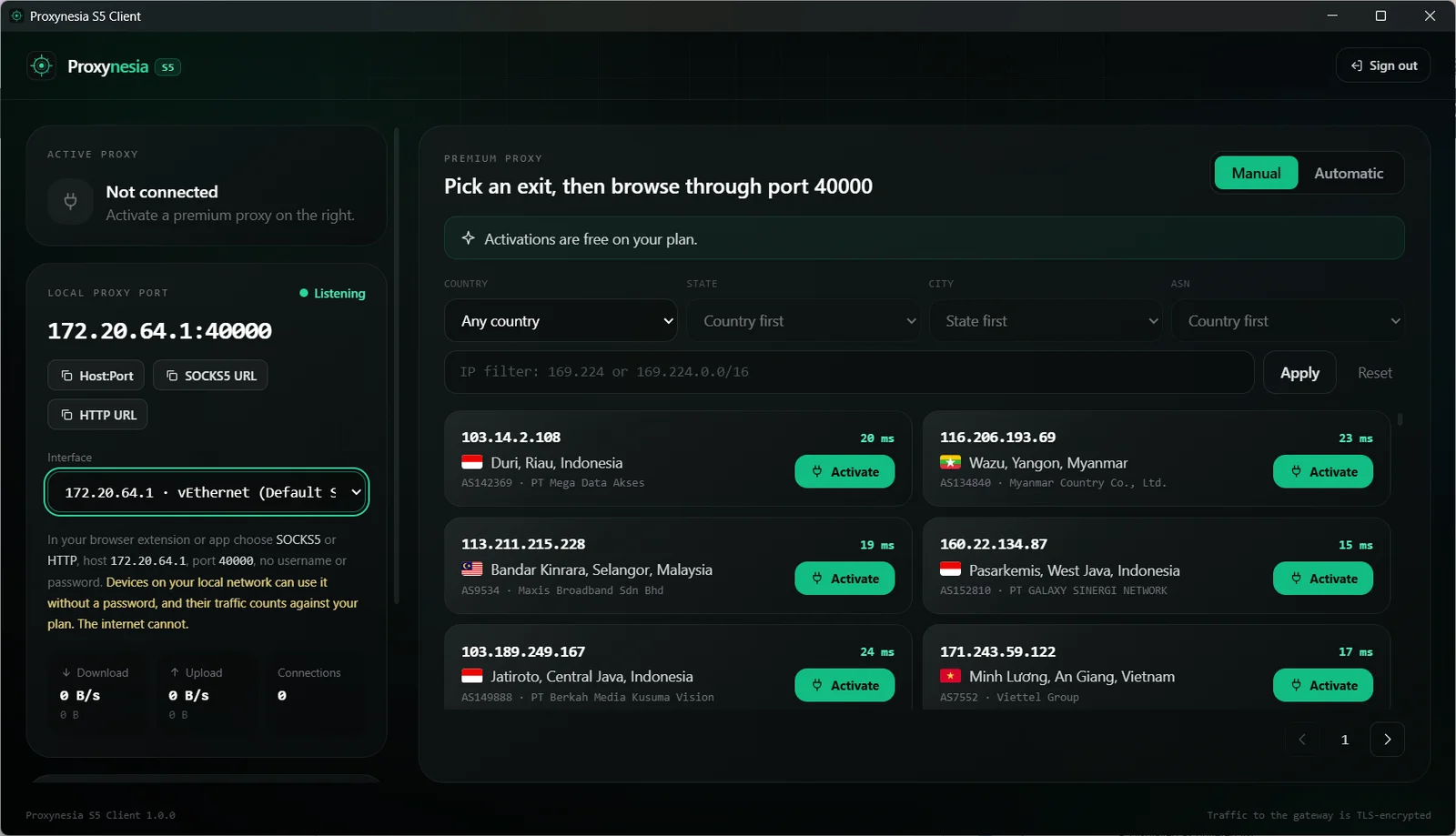
Proxynesia S5 Client on Windows: premium proxy list with filters and the local proxy port

Features

Everything Premium Proxy, on your desktop

The same premium proxies as your dashboard, served on your PC so every browser and tool can use them.

Premium proxies, one click

Browse live premium proxies by country, state, city, ASN or IP range, see their latency, and activate the one you want.

Automatic match

Enter the IP you want to look like and the client finds the closest available premium proxy for you.

SOCKS5 and HTTP on one port

The active proxy is served on 127.0.0.1:40000 for both SOCKS5 and HTTP, without a username or password to copy.

Works with any browser or app

Point a browser extension, an antidetect browser, a scraper or any tool with proxy settings at the local port.

Encrypted to the gateway

Traffic from your PC to the Proxynesia gateway travels over TLS. Hostnames your app sends to the proxy are resolved at the exit, not on your network.

Share on your local network

Optionally listen on one of your PC's network addresses so phones and other devices on your LAN can use the same proxy. The internet cannot.

Setup

From install to first request in a minute

Install from the Microsoft Store

Free download, verified and signed by Microsoft. Updates install automatically.

Sign in with Telegram

The app opens a Proxynesia page in your browser; approve there with the Telegram account you use on proxynesia.com.

Activate a premium proxy

Pick one in Manual, or let Automatic find the closest match to an IP, and press Activate.

Use 127.0.0.1:40000

Set SOCKS5 or HTTP, host 127.0.0.1 and port 40000 in your browser extension or app. Open api.ipify.org to see the proxy's IP.

Use the local port in your browser

Browsers do not send a username and password to SOCKS5 proxies, which is exactly why the client offers the proxy locally without one. Point the browser at 127.0.0.1:40000 and the client adds the credentials on the way to the gateway.

Chrome and Edge follow the Windows proxy settings, so use a proxy switcher extension to send only the browser through the port. Firefox has its own Network Settings.

Browser settings for Proxynesia S5 Client
BrowserWhere to set itValue
Chrome, Edge, BraveA proxy switcher extensionSOCKS5 or HTTP, 127.0.0.1, port 40000
FirefoxSettings → Network Settings → ManualSOCKS v5, 127.0.0.1, 40000, Proxy DNS on
Antidetect browsersProfile proxy settingsSOCKS5 or HTTP, 127.0.0.1:40000, no login
curl, Python, scriptsProxy URLsocks5h://127.0.0.1:40000
Check the proxy from Command Promptbat
curl -x socks5h://127.0.0.1:40000 https://api.ipify.org
curl -x http://127.0.0.1:40000 https://api.ipify.org

Share the proxy with your phone or another PC

Choose one of your PC's network addresses in the Interface menu instead of 127.0.0.1. Devices on the same local network can then use that address and port 40000 as a SOCKS5 or HTTP proxy, for example a phone on the same Wi-Fi.

The first time, Windows asks whether the app may accept connections: allow Private networks only. Connections from the internet are always refused, even if the PC has a public address, and the traffic of every device counts against your plan.

Troubleshooting

Most problems come down to one of these:

  • Port 40000 in use: another program holds it. Close it and press Retry in the app.
  • The browser shows your real IP: the extension is off or using another profile.
  • One IP checker fails while others work: some exit networks block individual checker sites.
  • Nothing loads after a while: the activation expired. Activate a proxy again.

Requirements

Light, and out of your way

Operating system
Windows 10 version 1809 or Windows 11 (64-bit)
Runtime
Microsoft Edge WebView2 (built into Windows 11 and current Windows 10)
Download size
About 5 MB
Account
A Proxynesia account with a plan or balance
Local port
127.0.0.1:40000 (SOCKS5 + HTTP)
Distribution
Microsoft Store only
  • No system-wide proxy, drivers or background services.
  • The local port only serves this PC unless you choose a network address.
  • Sign-in is kept encrypted for your Windows account; the app never asks for a password.
  • Traffic to the gateway is TLS-encrypted.
  • Updates arrive through the Microsoft Store automatically.

FAQ

Questions, answered

Why can't I just enter the proxy credentials in Chrome?
Chrome and Edge do not support SOCKS5 with a username and password. The client holds the credentials and offers the proxy to your browser locally without them.
Does the app start with Windows?
Start it when you need it. The last activation is restored when you open the app again, as long as it has not expired.
Can I use it with an antidetect browser or a scraper?
Yes. Any tool with SOCKS5 or HTTP proxy settings can use 127.0.0.1:40000.
Is Proxynesia S5 Client free?
Yes. The app is free on the Microsoft Store. Proxies use your Proxynesia plan or balance, and their traffic counts against your plan's allowance, exactly as on the website.
How do I use the proxy in Chrome, Edge or Firefox?
Install any proxy switcher extension, add a SOCKS5 (or HTTP) proxy with host 127.0.0.1 and port 40000, no username or password, and turn it on. Firefox can also use it directly from Settings > Network Settings.
Does the app change my Windows proxy settings?
No. It does not set a system-wide proxy or install drivers. Only the browsers and apps you point at the local port use the proxy; everything else keeps your normal connection.
Can my phone or another PC use the same proxy?
Yes, if you choose one of your PC's network addresses as the interface. Devices on your local network can then connect to that address on port 40000. Connections from the internet are always refused.
Is my traffic encrypted?
The connection from your PC to the Proxynesia gateway is encrypted with TLS. Your sign-in is stored encrypted for your Windows account and the app never asks for a password.
Why only the Microsoft Store?
Store packages are verified and signed by Microsoft, install without security warnings, and update automatically, so every user runs the current, trusted version.
Is there an app for Android?
Yes. Proxynesia for Android is available at proxynesia.com/download/android, with HTTP, SOCKS5 and VLESS Reality connections and per-app routing.

Explore more

Related

SOCKS5 proxy

How Proxynesia SOCKS5 access works for browsers, tools and automation.Learn more →

IP targeting proxy

Target an exact IP, subnet, ASN, city or country from the web dashboard.Learn more →

Proxynesia for Android

SOCKS5, HTTP(S) and VLESS on Android 10+, with per-app routing.Learn more →

Get Proxynesia S5 Client

Free on the Microsoft Store for Windows 10 and 11. Sign in with the Telegram account you use on proxynesia.com.